Login Tracer: debug SAML and OIDC logins in Chrome DevTools

Today we're releasing Login Tracer by Phase Two, a free Chrome DevTools extension for debugging SAML and OpenID Connect / OAuth logins. Open DevTools, select the Login Tracer panel, and log in: every SSO request in the tab is decoded, grouped into a login flow, and checked for common misconfigurations, with explanations of the Keycloak setting most likely behind each problem. It requests no permissions and makes no network requests.
Why we built it
Most of the SSO problems we help with come down to one question: what did the browser actually send, and what came back? Answering it usually means opening the Network panel, finding the right redirect among dozens of requests, copying a SAMLResponse or a token, and pasting it into a decoder website. That last step is the uncomfortable one. A SAML assertion or an access token is a live credential, and pasting it into a third-party site means trusting that site with it.
Browser extensions that trace logins already exist, and several decode SAML and OIDC well. What we kept missing was the next step: checking that a signature actually verifies against the identity provider's keys, explaining which setting most likely caused the failure, and following a brokered login from the app to Keycloak to an upstream identity provider and back as one flow. Some of them also ask to read and change data on every website you visit, all the time, not just while you are debugging.
We wanted a tool that shows the whole login, SAML and OIDC alike, and that cannot leak what it sees. We already had the decoding logic from our in-browser SAML Decoder and JWT Decoder, so we built Login Tracer on top of it as a DevTools panel.
What it shows
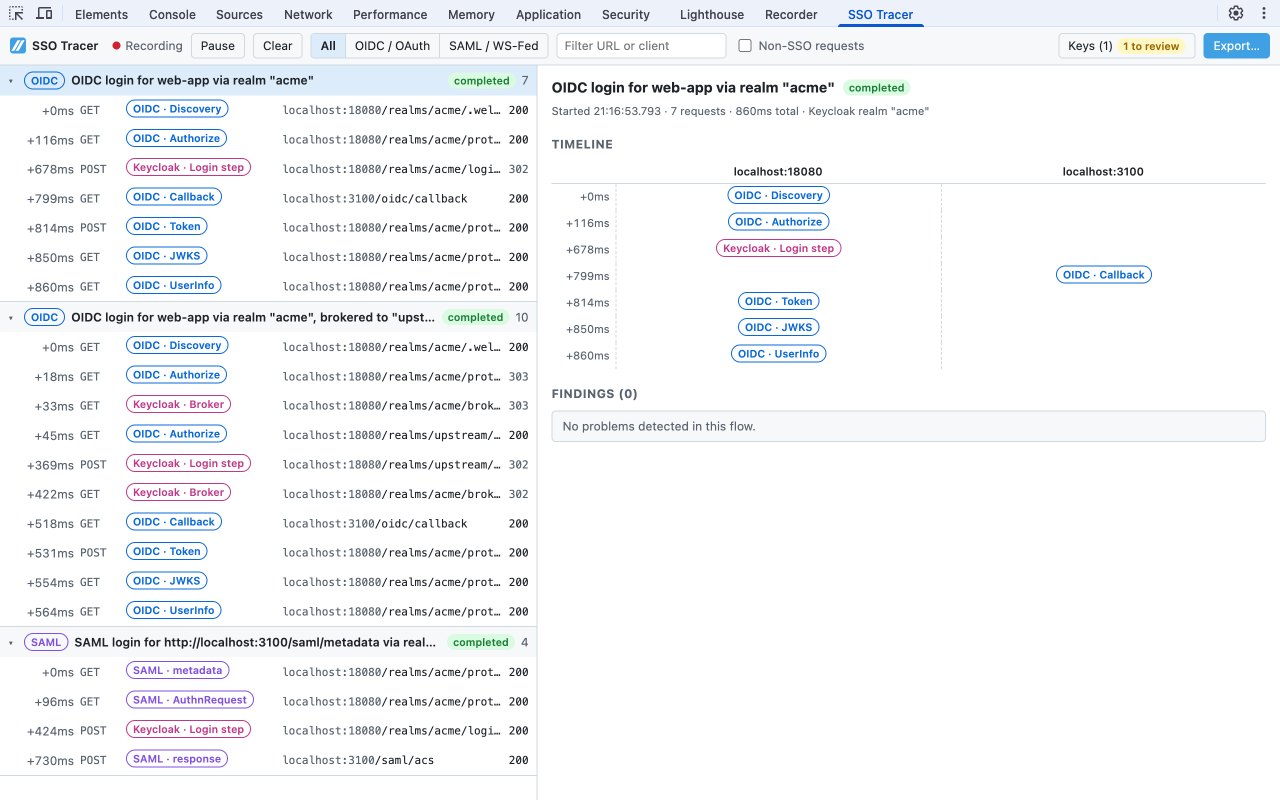
Login flows. Requests are grouped into flows by state, nonce, authorization code, SAML request ID and InResponseTo, and RelayState. A brokered login that goes from your app to Keycloak, on to an external identity provider, and back shows up as one flow with both legs, and each flow gets a timeline across hosts.
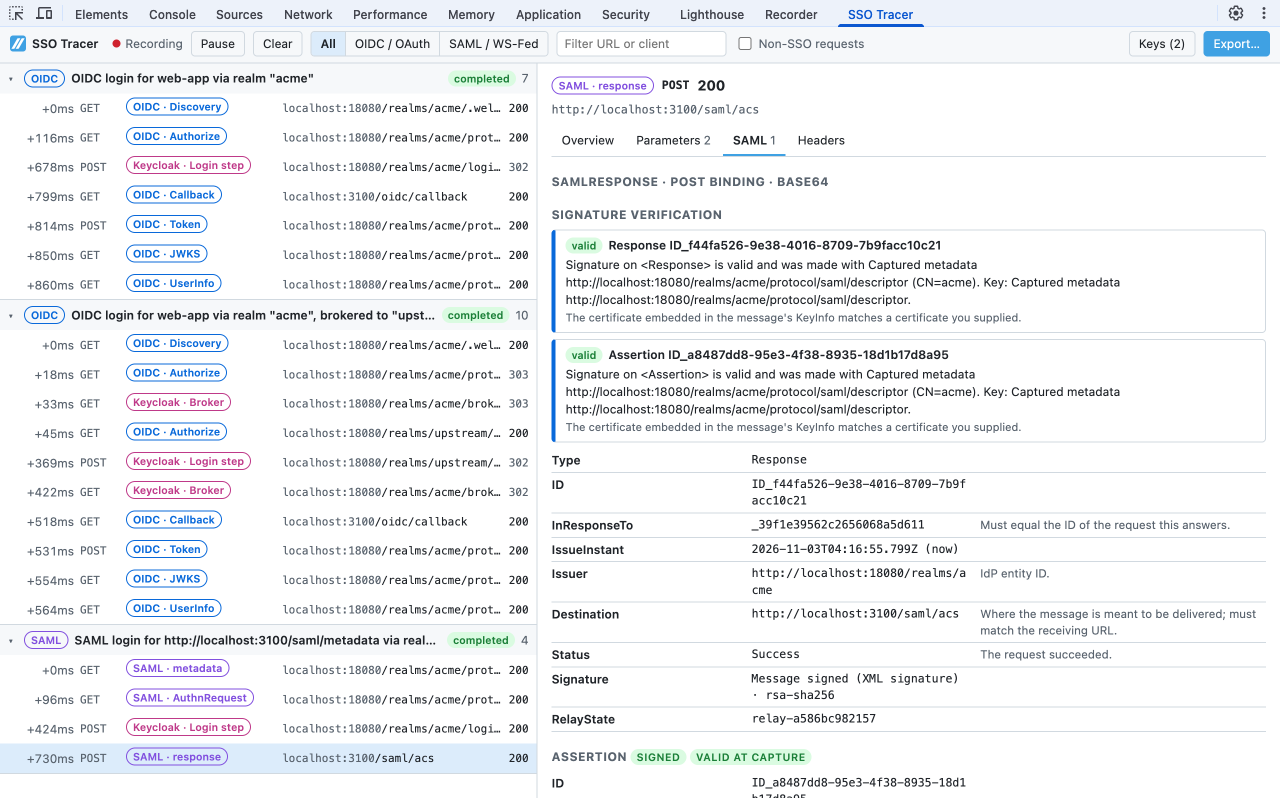
SAML. AuthnRequest, Response, LogoutRequest, and LogoutResponse over the HTTP-Redirect and HTTP-POST bindings, plus WS-Federation sign-in. You get the pretty-printed XML and a summary of the issuer, destination, ACS URL, audience, NameID, conditions, attributes, signatures, and status, with each field explained.
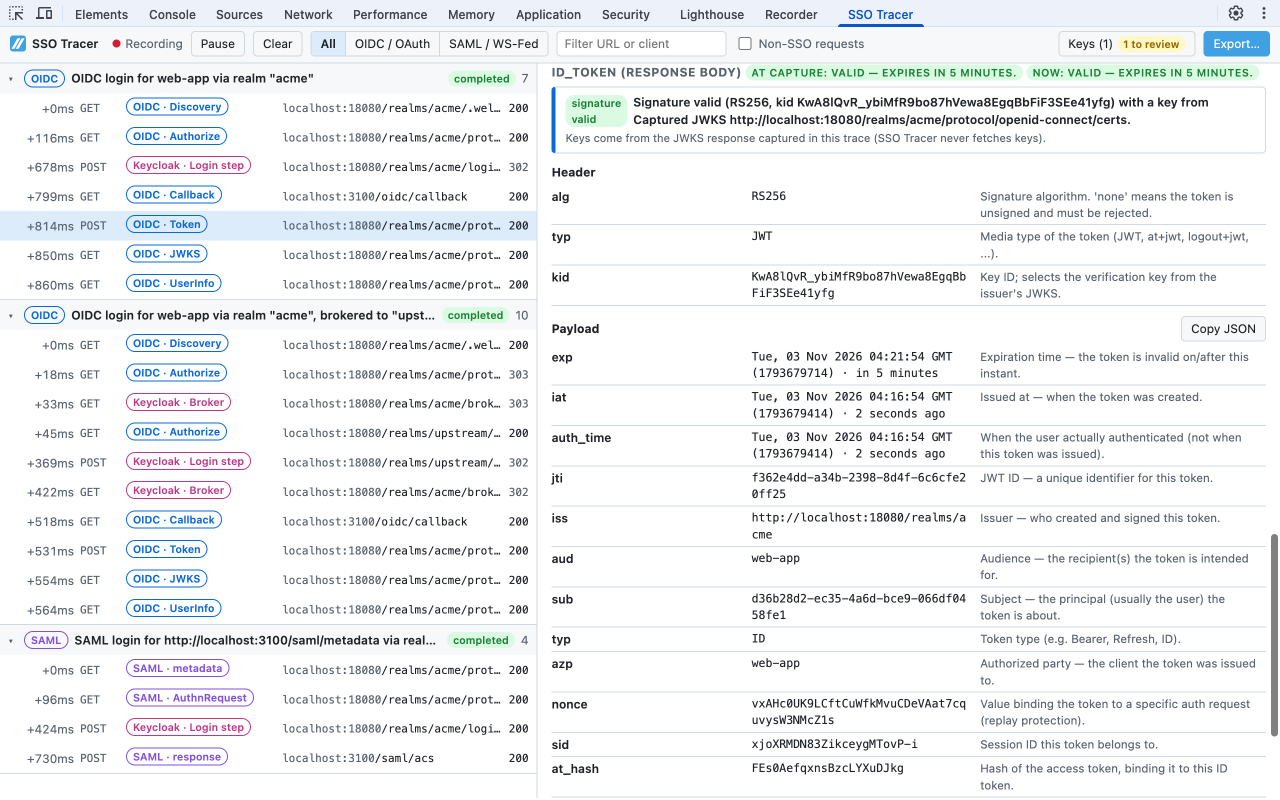
OpenID Connect and OAuth. Authorize requests, callbacks (query, form_post, and fragment responses visible in redirects), token requests and responses, discovery, JWKS, UserInfo, logout, PAR, introspection, and revocation. ID and access tokens are decoded with claim explanations, issued and expiry times relative to the capture and to now, and Keycloak realm and client roles.
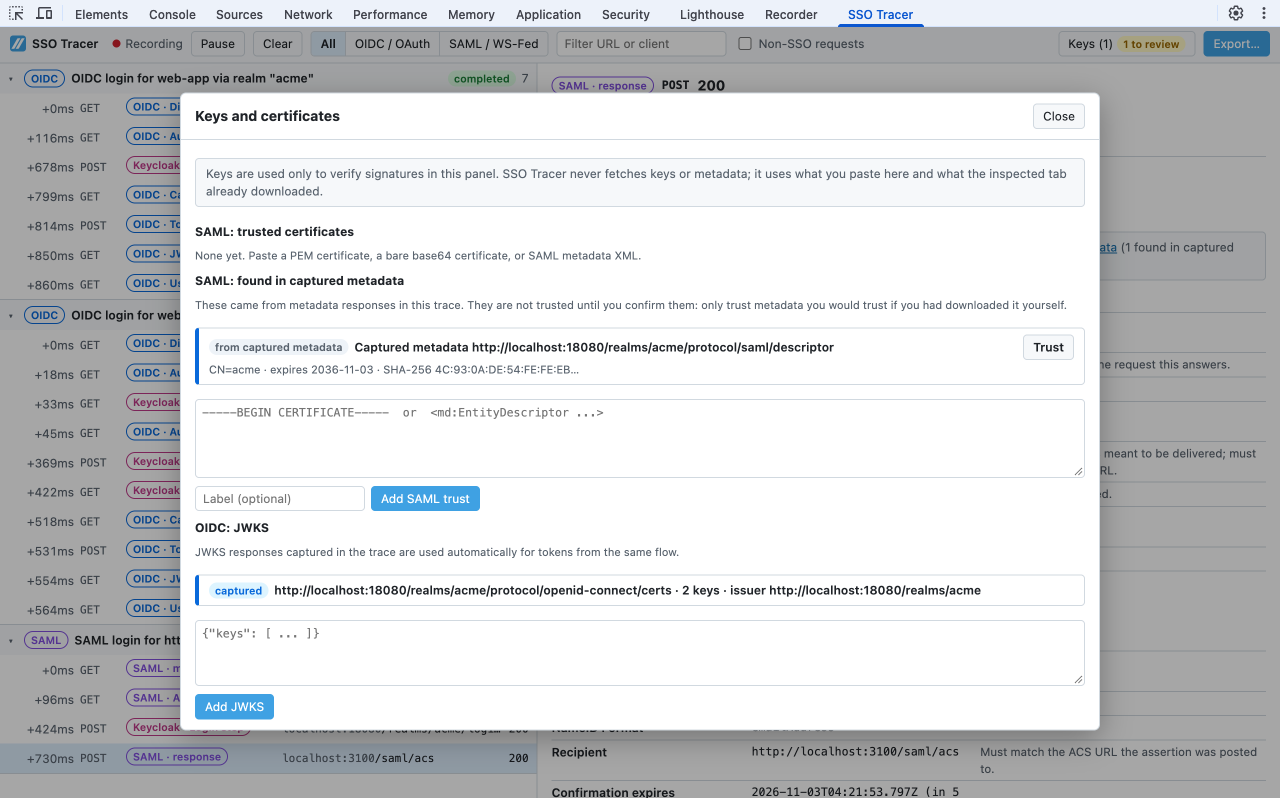
Signature verification without fetching keys. JWTs signed with RS, PS, ES, or EdDSA algorithms are verified against the JWKS the app fetched in the same login flow, or a JWKS you paste. SAML XML signatures and redirect-binding query signatures are verified against a certificate or metadata you paste, or against SAML metadata captured in the trace. Captured metadata is only used after you click Trust, because a key is only as trustworthy as where it came from.
Findings. Each flow is checked for the mistakes we see most often: missing PKCE, state, or nonce; the implicit flow; a redirect_uri that differs between the authorize, callback, and token requests; state and nonce mismatches; SAML Destination, ACS, Recipient, and Audience mismatches; assertions that were already expired or not yet valid when captured, which usually means clock skew; unsigned assertions; SHA-1 signatures; and OAuth and SAML error codes in plain English. When Keycloak is involved, Login Tracer recognizes realm, identity-brokering, and login-action endpoints and names the setting to check, such as Valid Redirect URIs, the Name ID format, Client signature required, or PKCE enforcement.
Private by design
Login Tracer reads the inspected tab's network log through the DevTools extension API. That API is available to any DevTools extension without a permission, and only while DevTools is open on that tab. So the manifest declares no permissions, no host permissions, no content scripts, and no background worker, and Chrome shows no permission warning when you install it. The extension cannot see other tabs, pages where DevTools is closed, or your browsing history.
It also makes no network requests of its own. The extension's Content Security Policy sets connect-src 'none', so even a bug could not send a token anywhere, and the source is linted to forbid fetch, XMLHttpRequest, WebSockets, and beacons. There is no telemetry, no analytics, and no account. Keys for signature checks come from what you paste or what the page already downloaded, and captured traces are discarded when you close DevTools.
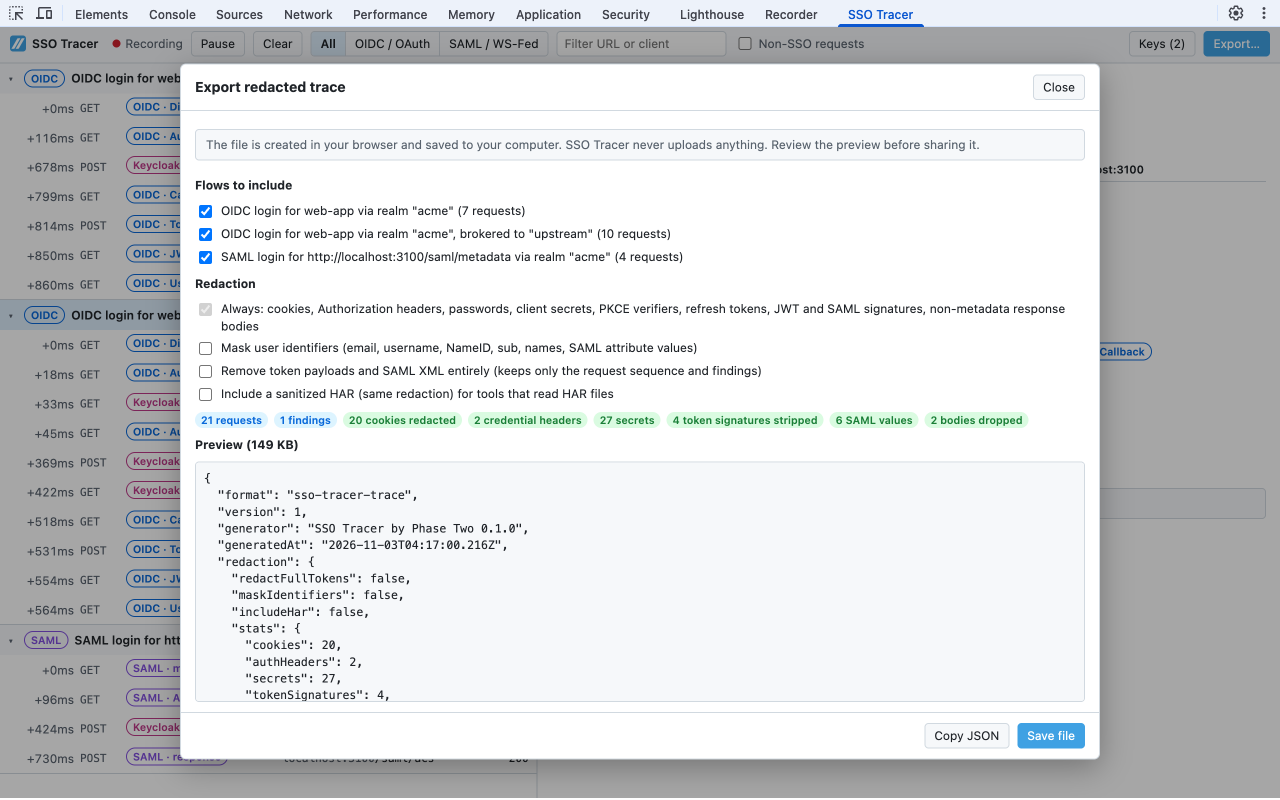
Sometimes you do need to share a trace, with a colleague or in a support ticket. Export… creates a JSON file on your machine, optionally with a sanitized HAR. Cookies, Authorization headers, passwords, client secrets, PKCE verifiers, refresh tokens, and token and SAML signatures are always removed, and you can also mask user identifiers or drop token and SAML contents entirely. The dialog shows how many values were removed and a full preview of the file before you save it.
The Login Tracer privacy policy has the details.
What it can and cannot see
Login Tracer sees what the DevTools network log sees: navigations, redirects, form posts, and requests made by the page. Open DevTools before you start the login and turn on Preserve log in the Network panel so redirects across page loads are kept. It cannot see requests made before DevTools was opened, logins in a popup or another tab (open DevTools there), or server-to-server calls such as a confidential client's back-end token exchange. Encrypted SAML assertions are not decrypted, and HMAC-signed tokens cannot be verified without the shared secret.
Try it
Login Tracer is free. Install it from the Chrome Web Store via the Login Tracer page, which also covers setup and common questions. If you already have a message or token in hand, our free browser-based developer tools decode SAML, JWTs, certificates, and JWKS, and run OIDC flows, without installing anything.