Free Chrome DevTools extension
Login Tracer by Phase Two
Debug SAML and OpenID Connect / OAuth logins in a DevTools panel. Every SSO request is decoded, grouped into a login flow, and checked for misconfigurations. Nothing leaves your browser.
No permissions · No network requests · No account
What it does
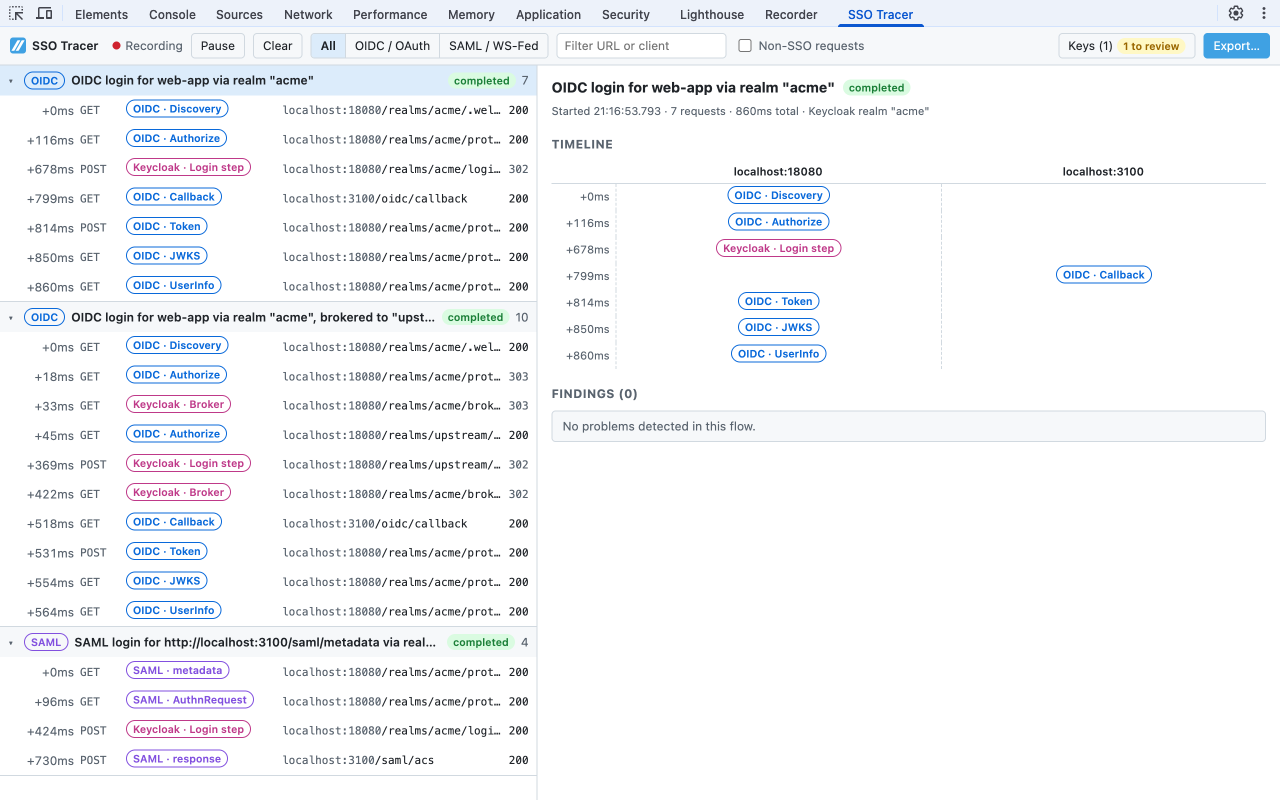
Login flows, not request lists
Requests are grouped into flows by state, nonce, authorization code, SAML request ID / InResponseTo, and RelayState, including brokered logins that hop from your app to Keycloak to an external identity provider and back.
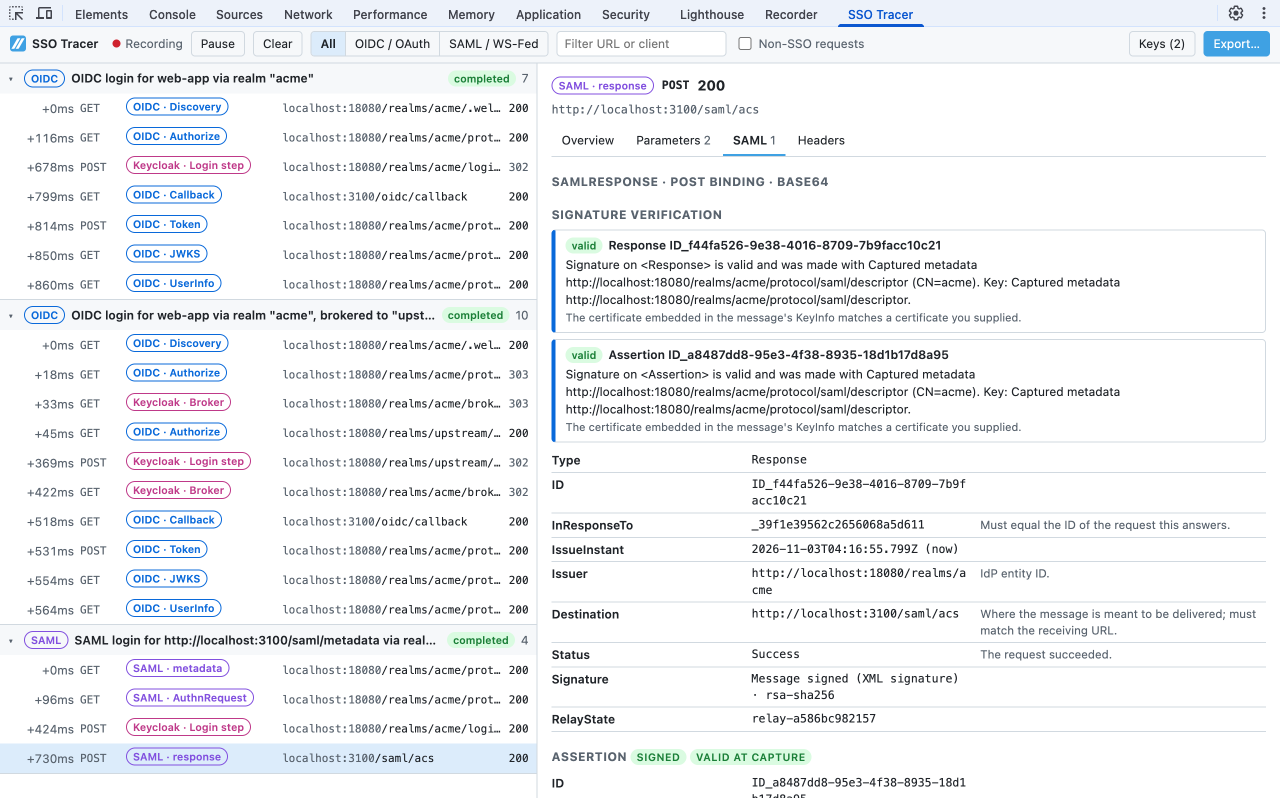
SAML, decoded
AuthnRequest, Response, LogoutRequest, and LogoutResponse over the HTTP-Redirect and HTTP-POST bindings, plus WS-Federation sign-in. Pretty-printed XML and a plain-English summary of issuer, destination, audience, NameID, conditions, attributes, and status.
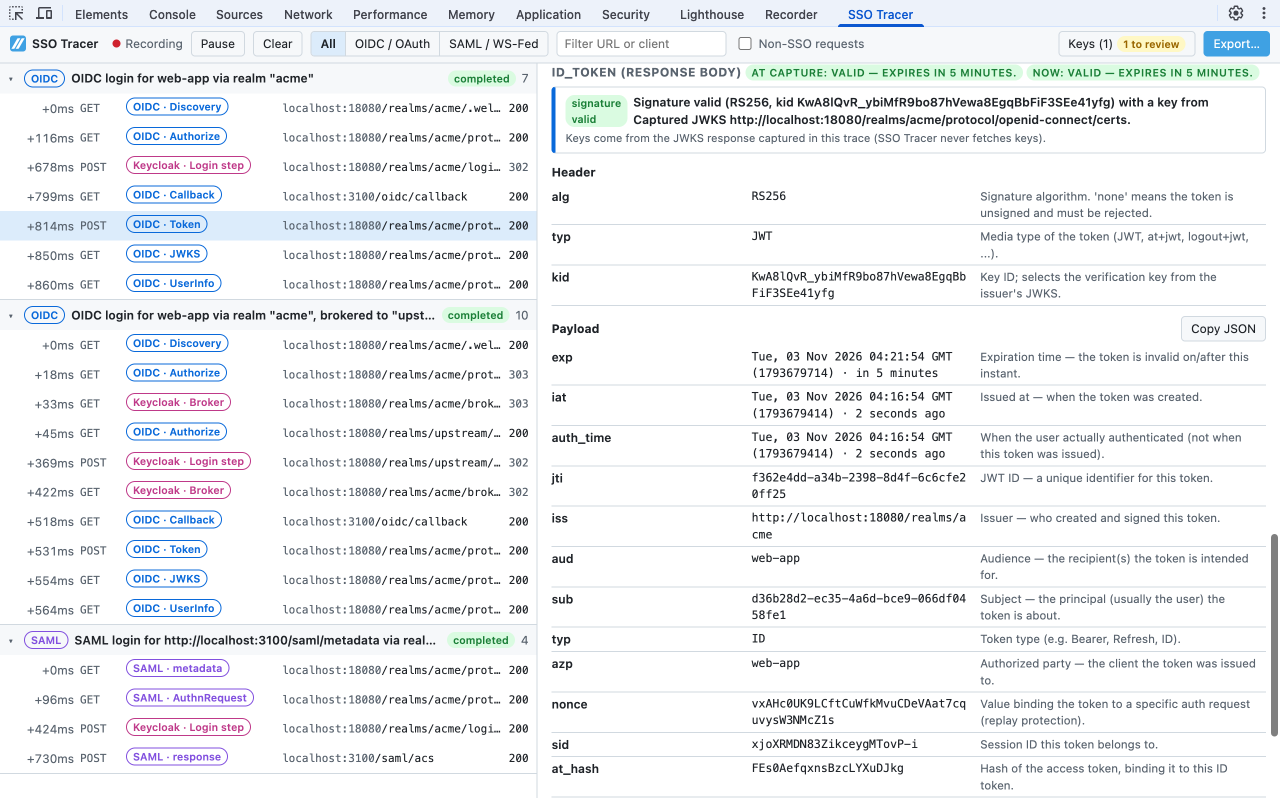
OIDC and OAuth, decoded
Authorize requests, callbacks (query, form_post, and fragments in redirects), token, discovery, JWKS, UserInfo, logout, PAR, introspection, and revocation. ID and access tokens are decoded with claim explanations and expiry times.
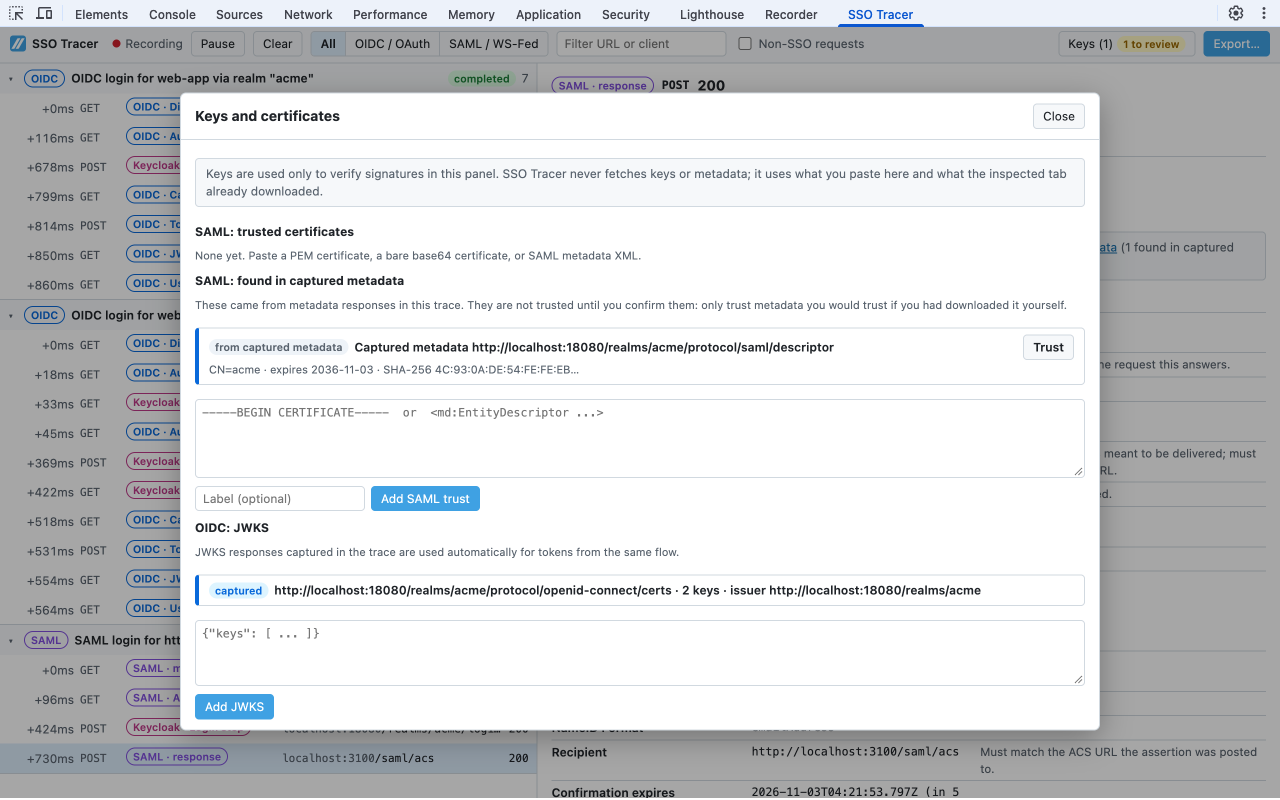
Signatures verified offline
SAML XML and redirect signatures are checked against a certificate or metadata you paste, or metadata captured in the trace once you trust it. JWTs (RS, PS, ES, EdDSA) are checked against the JWKS captured in the same flow. Keys are never fetched.
Findings that name the setting
Missing PKCE, state, or nonce; redirect_uri mismatches; SAML Destination, Audience, and ACS mismatches; expired assertions and clock skew; SHA-1 signatures; and OAuth and SAML error codes, with the Keycloak setting most likely behind each one.
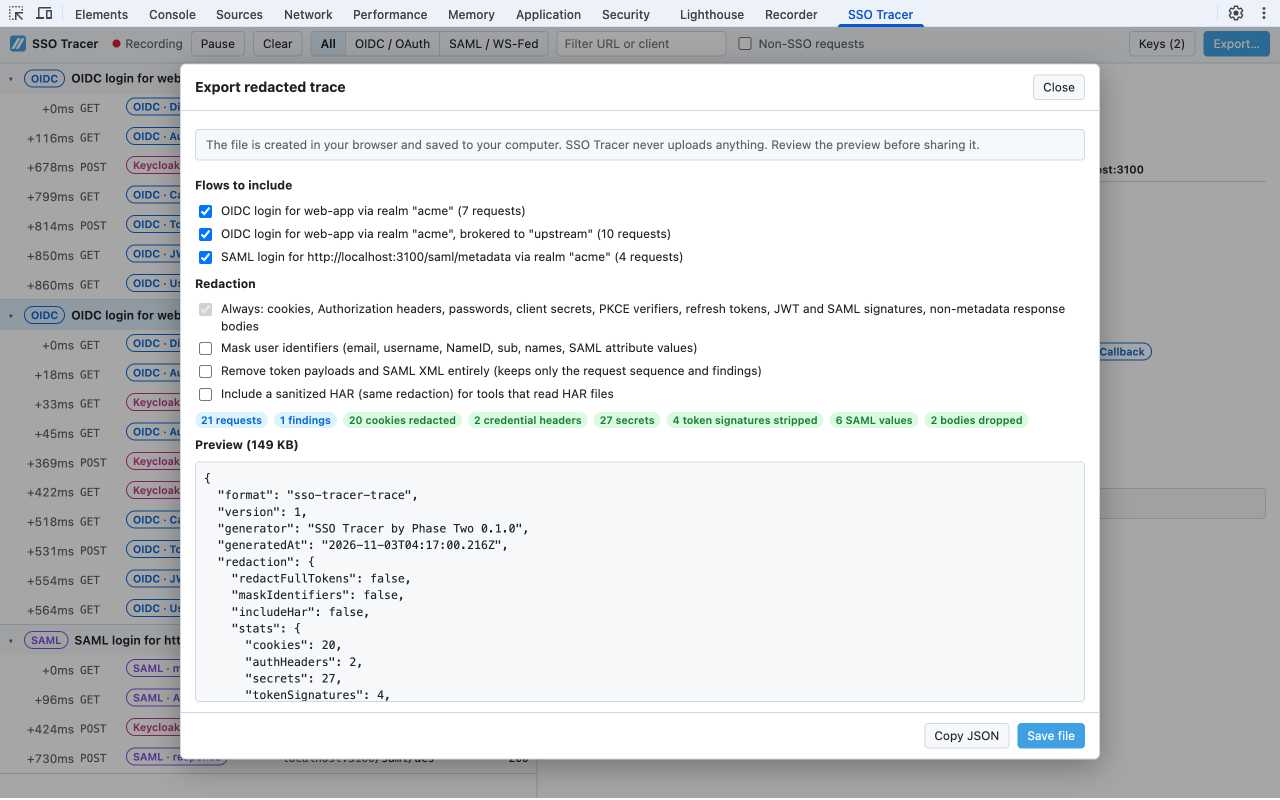
Redacted export
Save a JSON trace, optionally with a sanitized HAR, for a support ticket. Cookies, Authorization headers, passwords, client secrets, PKCE verifiers, refresh tokens, and signatures are always removed, and you preview the file before saving it.
Install and use it
- Add Login Tracer to Chrome from the Chrome Web Store (the listing is coming soon).
- Open DevTools on the tab where the login will happen (
F12, orCmd+Option+Ion macOS) before you start the login. - In the Network panel, turn on Preserve log so redirects across page loads are kept.
- Select the Login Tracer panel (it may be under the
»overflow menu) and log in. Select a flow for its timeline and findings, or a request for its decoded parameters, SAML, tokens, headers, and response body. - Use Export… to save a redacted trace to your machine.
Login Tracer sees what the DevTools network log sees: browser navigations, redirects, form posts, and requests the page makes itself. It cannot see requests made before DevTools was opened, logins in another tab or popup, or server-to-server calls such as a confidential client's back-end token exchange.
Private by design
Tokens and SAML assertions are credentials. Debugging a login should not mean pasting them into a third-party website, and it should not mean installing an extension that can read every page you visit. Login Tracer is built so that it cannot leak what it sees:
- No permissions. The manifest declares no permissions, no host permissions, no content scripts, and no background worker. Chrome shows no permission warning on install.
- Only while DevTools is open. It reads the network log of the tab you are inspecting, through the DevTools extension API, and only while DevTools is open on that tab. It has no access to other tabs or your browsing history.
- No network requests. The extension's Content Security Policy sets
connect-src 'none', so it cannot make outgoing connections. There is no telemetry, no analytics, and no account. Signature keys come from what you paste or what the page already downloaded. - Nothing kept. Captured traces live in memory and are discarded when you close DevTools.
- Redacted export. When you do need to share a trace, credentials are removed before the file is created, and you see a preview of exactly what it contains.
Read the full Login Tracer privacy policy.
Login Tracer and our in-browser decoders
The SAML Decoder and JWT Decoder are web pages: paste one SAML message or token and they decode and verify it, entirely in your browser. They are the right tool when you already have a value in hand, for example from a log or a colleague.
Login Tracer captures the whole login while it happens, so you do not have to copy anything out of the Network panel. Because it sees every step, it can group requests into flows, check that a callback matches its authorize request or a SAML Response matches its AuthnRequest, and verify tokens against the JWKS fetched in the same flow. Both use the same SAML and JWT decoding logic. For the rest of our free utilities, such as the Authorize URL Inspector and the JWKS Verifier, see all developer tools.
Frequently asked questions
What is Login Tracer?
A free Chrome DevTools extension from Phase Two for debugging single sign-on. It adds an Login Tracer panel to DevTools that decodes the SAML and OpenID Connect / OAuth requests in the inspected tab, groups them into login flows, verifies signatures, and flags common misconfigurations.
Does Login Tracer send my tokens or SAML assertions anywhere?
No. The extension makes no network requests of its own: its Content Security Policy sets connect-src 'none', so it could not upload anything even if it tried. There is no telemetry, analytics, or account. Captured data stays in memory and is discarded when you close DevTools.
What permissions does it need?
None. The manifest declares no permissions, no host permissions, no content scripts, and no background worker, so Chrome shows no permission warning when you install it. It reads the network log through the DevTools extension API, which is only available while DevTools is open on the tab.
Why don't I see my login?
Login Tracer sees what the DevTools network log sees. Open DevTools on the tab before you start the login and turn on Preserve log in the Network panel so redirects across page loads are kept. Logins in popups need DevTools open in the popup, and server-to-server calls, such as a confidential client's back-end token exchange, never pass through the browser.
Can it verify signatures without fetching keys?
Yes. For SAML, paste the IdP or SP certificate or metadata, or trust SAML metadata the page already loaded. For OIDC, tokens are checked against JWKS responses captured in the same login flow, or a JWKS you paste. Login Tracer never fetches keys itself. HMAC-signed tokens (HS256 and similar) cannot be verified without the shared secret.
Can it decrypt encrypted SAML assertions?
No. Decrypting an EncryptedAssertion takes the service provider's private key, and Login Tracer does not ask for one. It detects encrypted assertions and decodes the rest of the message.
Is it safe to attach an export to a support ticket?
The export always removes cookies, Authorization headers, passwords, client secrets, PKCE verifiers, refresh tokens, and token and SAML signatures, and can also mask user identifiers or drop token and SAML contents entirely. You see a full preview before saving, so check it for anything your organization considers sensitive.
Does it only work with Keycloak?
No. It decodes standard SAML 2.0, WS-Federation, OAuth 2.0, and OpenID Connect traffic from any provider. With Keycloak it goes further: it recognizes realm, identity-brokering, and login-action endpoints and explains the Keycloak setting most likely behind an error.
How is it different from the SAML Decoder and JWT Decoder?
The web tools decode one message or token you paste. Login Tracer captures the whole login as it happens, so it can correlate requests, compare a response with the request it answers, and verify tokens against keys from the same flow. Use the web tools when you already have a value in hand.
Which browsers are supported?
Login Tracer is built and tested for Google Chrome, version 110 or later.
Login Tracer is built by Phase Two, the team behind hosted Keycloak and the Phase Two Keycloak extensions.