Keycloak Themes: Custom Login, Admin, Account, and Email

Keycloak has exactly four theme types you can set on a realm: login, account, admin, and email. Each one is its own directory of templates, message bundles and static assets, packaged into a JAR and dropped into the server's providers/ directory. That is the whole extension point. It is also why custom Keycloak themes tend to become a standing maintenance cost: your templates are copies of upstream files, and upstream moves every release.
We've completely rebuilt our bundled Keycloak themes. What used to live as a tangle of custom pages inside a forked Keycloak repository is now a first-class Keycloakify-based React application that ships all four: login, admin, account, and email. The result is faster to maintain, far more capable, and dramatically better out of the box for the organizations using Phase Two today.
Switching themes is four realm fields. Set them in Realm settings → Themes in the admin console, or from the CLI. Verified against Keycloak 26.7.3:
kcadm.sh update realms/<your-realm> \
  -s loginTheme=phasetwo-ui \
  -s accountTheme=phasetwo-ui \
  -s adminTheme=phasetwo-ui \
  -s emailTheme=phasetwo-ui
Starting now, all Phase Two containers ship with this theme bundled. Any realm you create through the Phase Two Dashboard automatically gets the new login, admin, account, and email themes active, with no configuration required. The first time a user hits your login page or receives an email from your realm, it already looks good.
Why We Did It
The old setup worked, but it accumulated debt fast. We maintained a fork of the Keycloak repository with admin UI customizations living on branches named things like 26.3.0_orgs_adminui. Every Keycloak release meant rebasing those changes, resolving conflicts across thousands of lines of upstream JavaScript, and hoping nothing subtle broke. Testing required spinning up a full Keycloak image just to verify a button label.
Beyond the maintenance burden, the old approach had strong limits on what we could do. The login theme was limited by what you could do with PatternFly (RedHat's design framework). The email theme was limited to just overrides but you couldn't easily brand it. The admin console tweaks were limited to what we could fit into the existing UI without breaking things. And we had not even touched the account theme, which meant users had a completely different experience once they logged in. Lastly, when users jumped from our dashboard into the Keycloak admin console, the experience was jarring because it didn't reflect the product they had just been using.
We wanted:
- Maintainability that didn't require tracking every Keycloak release by hand
- Runtime configurability so customers can change logos and colors easily without needing to redeploy or write custom themes
- A richer admin experience for managing organizations, members, roles, and styles
- A modern, polished look that doesn't feel like enterprise software from 2015
- A proper dashboard for navigating what Phase Two adds on top of Keycloak
- Modern fonts, layouts, and components that look good. Something about the RedHat fonts didn't seem to have the polish that most modern products have
A combination of Keycloakify and Phase Two's large extension capabilities made it possible to build this without needing to fork Keycloak or maintain custom JARs with static templates.
If you want to start trying it now, grab our latest image from Quay.io or try it out on the Phase Two Dashboard.
The Stack
The new theme, called phasetwo-ui, is a React application built with:
- Keycloakify 11 — bridges React components to Keycloak's theme SPI, handles JAR packaging automatically. We are sponsors of the project
- shadcn/ui + Tailwind CSS 4 — modern, composable component library for the login and account themes. If you want to build your own rather than use ours, start from our shadcn Keycloak theme starter
- PatternFly 5 — used in the admin and account console to avoid a complete rewrite of those complex interfaces while still allowing us to inject our own styles and components
- Vite — fast builds and hot module replacement during development
- Storybook — isolated component development and visual testing
- Playwright — end-to-end tests that exercise the admin UI against a real Keycloak instance
The Java side extends the Keycloak SPI to handle runtime theme loading, dynamic CSS generation, Mustache template rendering, and a configurable email sender. All of it ships as a single JAR dropped into the Keycloak providers/ directory.
Login Theme
Out of the box, Keycloak's default login pages are functional but bare. The new phasetwo-ui login theme replaces them entirely with something that looks like a product, not a framework demo. It's a two-column layout with the branding panel on the right on desktop and a mobile-optimized single-column view on smaller screens. It supports all 21+ standard Keycloak login flows: standard authentication, registration, password reset, TOTP setup, WebAuthn enrollment, account deletion, email verification, identity provider linking, OAuth consent, and error handling.
For new Phase Two realms, this is now the default. Your users will see this from day one.
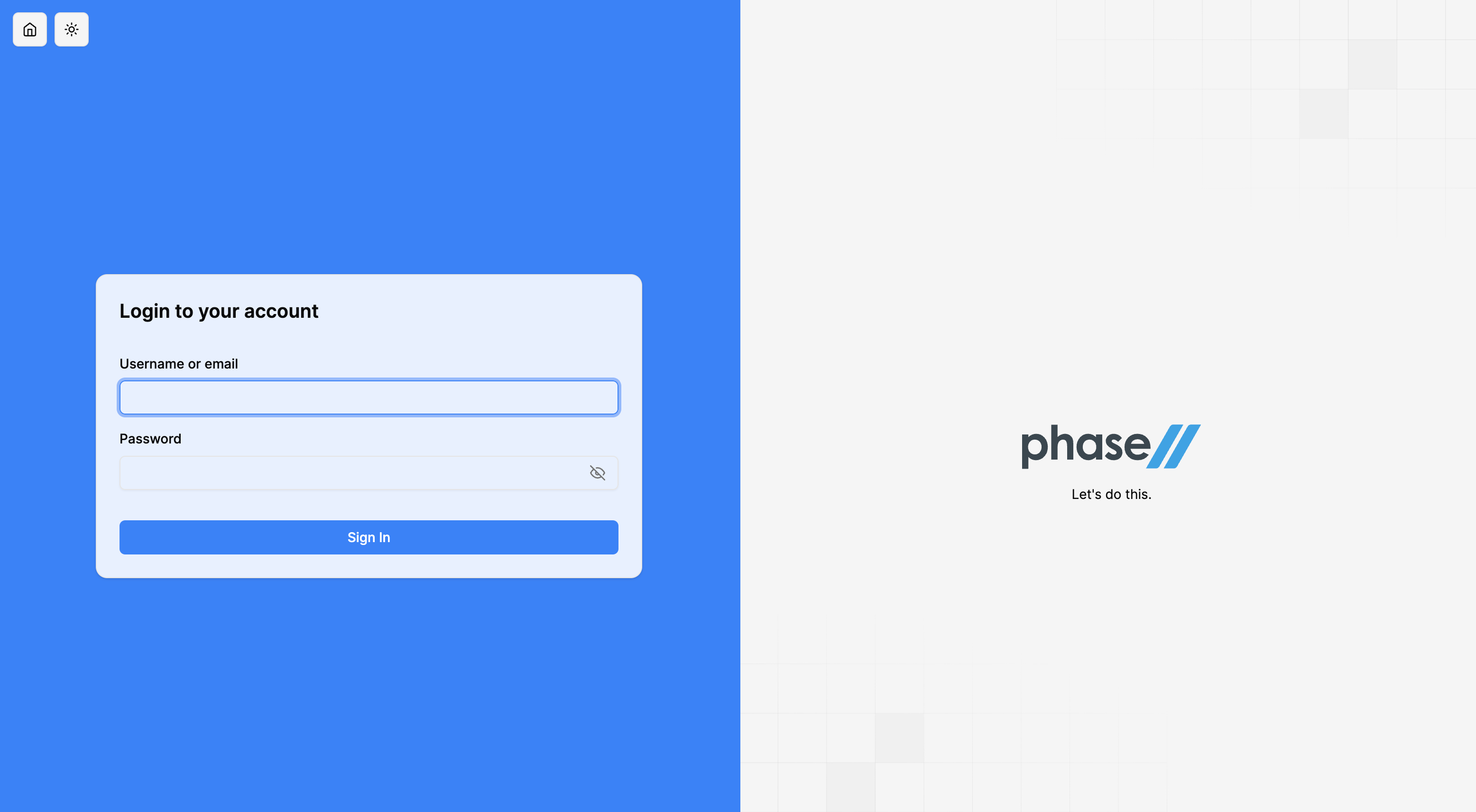
The bigger story is runtime configurability. Every visual element of the login page is controlled by realm attributes—no redeploy required:
- Logo — set a URL and it shows up immediately
- Favicon and app icon — same approach, including PWA-ready app icons
- Primary, secondary, and background colors — picked in the admin UI, reflected instantly in login
- Custom CSS — inject arbitrary overrides without touching templates
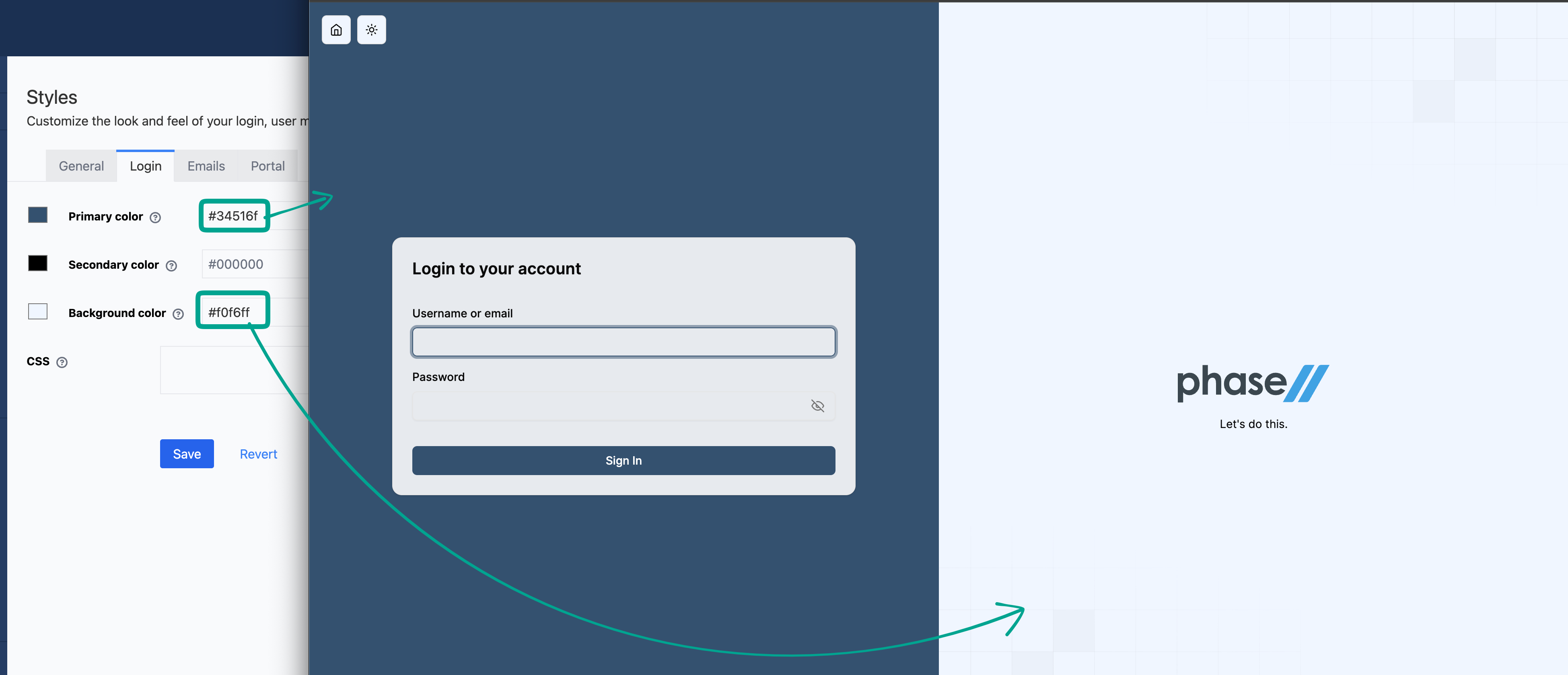
These attributes are served through a dynamic /realms/<realm>/assets/css/login.css endpoint that the Java SPI generates on the fly, mapping realm attributes to the right CSS variables. Every attribute, including the dark-mode overrides, is listed in the UI customization docs. The earlier attribute-based approach this grew out of is described in How to customize login pages.
Dark mode is supported. Language switching is built in. Fallback logos handle the case where a custom logo URL fails to load.
Admin Theme
This is where the most work went, some visual but a lot of it underlying plumbing. The admin theme extends Keycloak's native admin console with a dedicated Phase Two panel that surfaces everything our extensions add.
Organizations
The organizations section is a full CRUD interface for everything the Keycloak Organizations extension provides:
- Organization list with creation and deletion
- Organization details — name, description, display name, attributes
- Members — add, remove, view member details and organization-scoped attributes
- Roles — create and manage roles that are scoped to a specific organization
- Identity Providers — assign IdPs to organizations and configure sync modes
- Domains — domain-based routing configuration
- Invitations — send and manage membership invitations by email
- Settings — enabled/disabled state and other org-level configuration
The API calls are fully typed against our OpenAPI schema, so the UI and the API stay in sync automatically.
Custom Styles
The styles panel gives realm administrators direct control over branding without writing any code. It has four tabs:
- General — upload URLs for logo, favicon, and app icon with live image previews
- Login — color pickers for primary, secondary, and background colors plus a CSS editor for arbitrary overrides
- Email — customize email template branding including footer text
- Portal — portal-specific styling controls for the Admin Portal, a self-serve application for end users to manage their account and Organization memberships without needing access to the full Keycloak admin console
Everything saves directly to realm attributes. The login page picks up changes immediately because the CSS endpoint reads those attributes on every request.
Account Theme
The account theme wraps Keycloak's standard account management UI in the same visual language as the login and admin themes. Users get a consistent branded experience whether they're logging in, managing their sessions, or updating their profile. A session expiration warning overlay prevents users from losing unsaved changes mid-session.
Email Theme
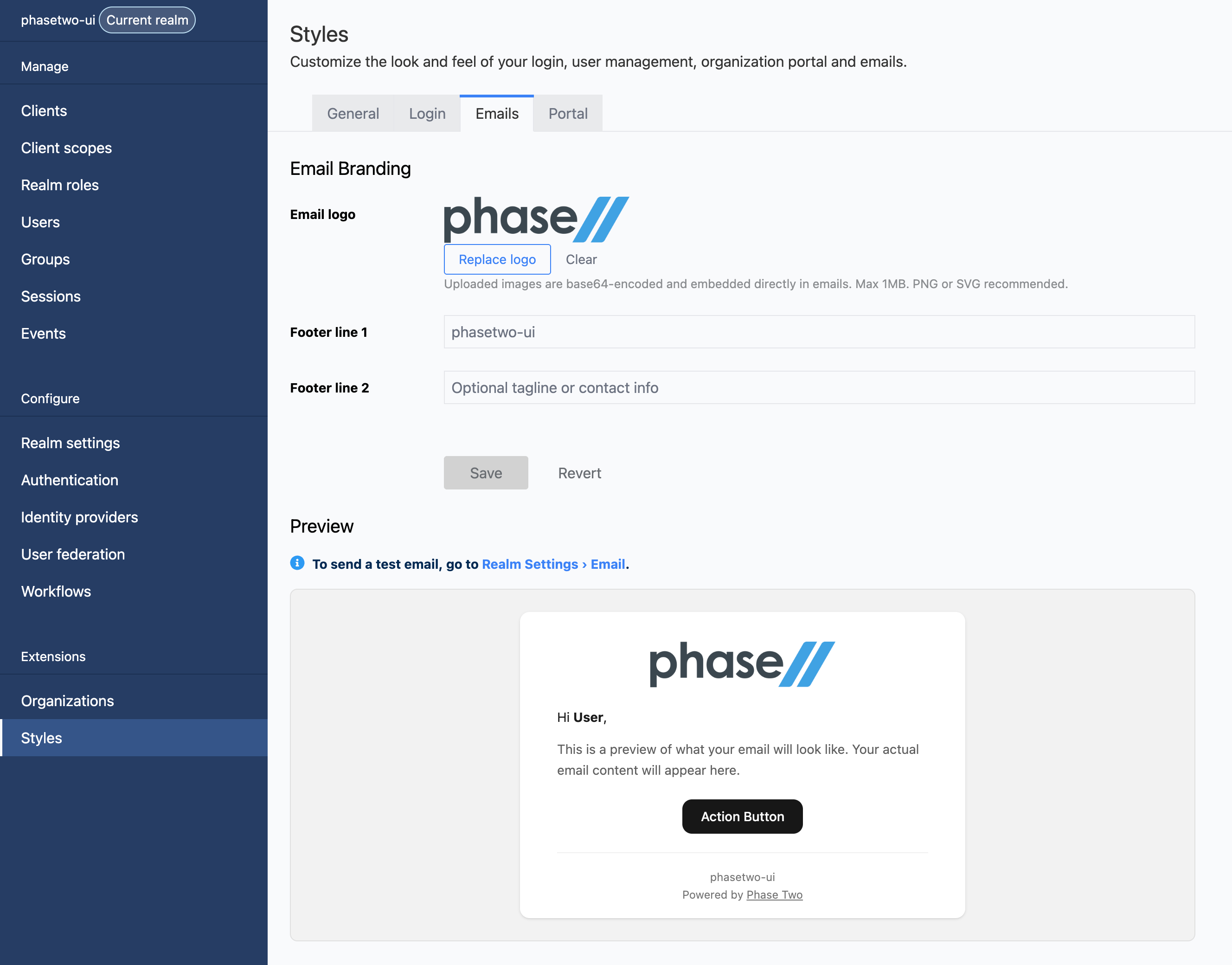
The default Keycloak email templates are plain text in a minimal HTML shell. They get the job done, but they don't reflect well on the product they're sending from. Our new email theme replaces that with a professional, fully branded layout—clean typography, your logo embedded directly in the message, a structured content area with appropriate padding and shadow, and a configurable footer. All coupled with an in-page preview experience. Emails from your realm will look like they came from a real product from day one.
For realms created through the Phase Two Dashboard, this is now the default. No setup required. For the template-by-template detail, see How to customize email templates in Keycloak.
Beyond the out-of-the-box look, we addressed the deeper problem: email was arguably the most rigid part of the old setup. Static Freemarker templates meant any copy or branding change required a build and deploy. We replaced that with two mechanisms.
Attribute-based template overrides — any .ftl template can be overridden by setting a realm attribute with the key _providerConfig.theme.email.templates.<template-name.ftl>. Message strings work the same way via _providerConfig.theme.email.messages.<message-key>. No redeploy, no file system access required.
Mustache template support — we ship an alternative EmailTemplateProvider implementation that renders Mustache templates in addition to Freemarker. This opens up a simpler, more readable template syntax and lets customers supply their own templates through the admin UI without needing to understand Freemarker's quirks.
The email layout is configurable without touching templates: set footer text lines and a logo URL from the Phase Two → Styles → Email panel in the admin console and they reflect immediately.
The Dashboard
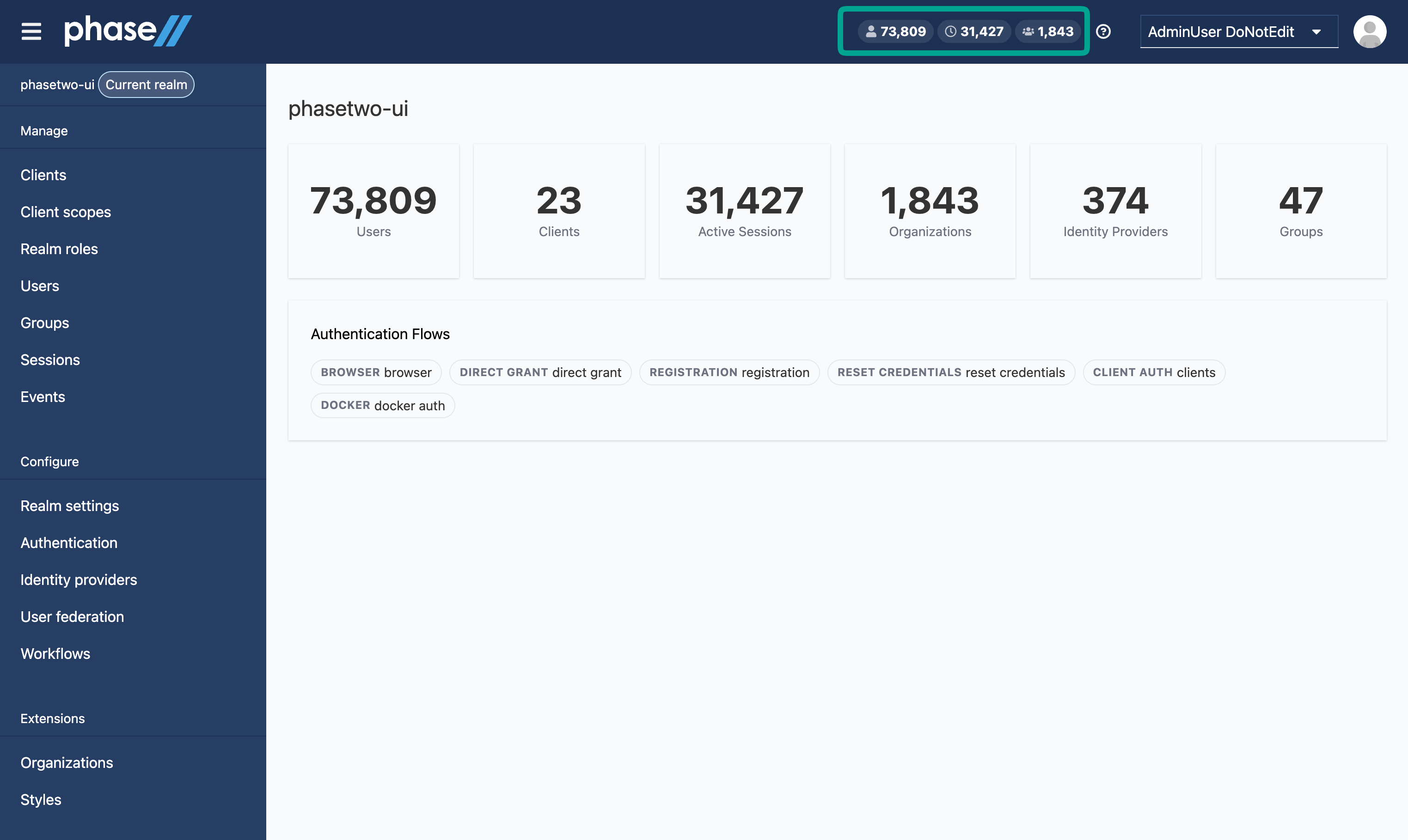
One of the additions we're most excited about is the Phase Two Dashboard—a dedicated view in the admin console that gives realm administrators a high-level picture of their deployment at a glance. Organizations, members, and activity stats surface immediately without having to drill into individual sections. It's the kind of overview that makes Keycloak feel less like a configuration interface and more like a product. We have started basic here, but will continue to expand the dashboard with more insights and actionable items over time.
Easier to Maintain
The practical benefit for us is that upgrading Keycloak no longer means rebasing thousands of lines of forked admin UI JavaScript. Keycloakify handles the bridge between our React components and the Keycloak theme SPI. When Keycloak's admin UI packages update, we update our Keycloakify dependencies. Our customizations live in well-defined extension points, not in modified copies of upstream files.
We also get proper tooling for the first time: Storybook for developing components in isolation, Playwright tests that exercise the admin UI against a real Keycloak instance, and a docker compose up local environment that lets any developer work on the theme without needing deep Keycloak internals knowledge.
How to Get It
Phase Two managed service — it's already there. All containers now ship with the phasetwo-ui theme bundled. New realms created through the Phase Two Dashboard have it active automatically. Existing realms can switch by setting phasetwo-ui as the theme for login, admin, account, and email in realm settings, then configuring branding from the Phase Two → Styles panel.
Self-hosted with the Phase Two image — the theme is included in the Phase Two Keycloak image. Pull the latest image and select phasetwo-ui in your realm theme settings.
Self-hosted with your own Keycloak — the Keycloak themes extension is open source and works on stock Keycloak. Build and install it from the keycloak-themes repository:
mvn clean install -DskipTests
cp target/keycloak-themes-*.jar /path/to/keycloak/providers/
Restart Keycloak and select phasetwo-ui for login, admin, account, and email in your realm configuration.
Looking Forward
Visual editor for login and email
The styles panel today gives you color pickers, a logo field, and a CSS editor. That covers a lot, but we want to go further. We're building a visual editor directly into the Phase Two Dashboard that lets you make fine-grained design changes to your login and email themes—adjusting layout, spacing, typography, background images, and component styles through a live preview interface rather than writing CSS by hand.
The goal isn't to replace a fully bespoke login experience. Some brands need total control, and the custom CSS path will always be there for that. But for the vast majority of teams, getting 95% of the way there without a designer or a build pipeline is exactly what's needed. Your login page should feel like it belongs to your product, and we think that should be achievable in an afternoon, not a sprint.
More capability in the Admin and Account UIs
We're continuing to expand what the admin and account UIs can do. On the admin side, more of our extension capabilities will surface directly in the Phase Two panel as we add features—so you're managing everything through the console rather than through API calls or raw attribute editing.
On the account side, we're reworking several views to feel more like a modern product interface. One early change is moving the account list views from a table layout to a tile-based interface—easier to scan, more room for useful metadata, more familiar UX, and a look that fits better alongside the rest of the theme.
For email themes, we're adding more template variables and making it easier to customize the content and layout of emails without needing to write custom templates.
If you have feedback or run into anything, open an issue on GitHub or drop us a line.
Where to start
The theme is open source: start with the keycloak-themes repository, or read what the Keycloak themes extension covers before you build your own. If you would rather not run any of it yourself, our managed Keycloak clusters ship it by default.