Create a Cluster
Creating a cluster can be done through our Dash self-service tool or by contacting Phase Two for assistance.
Creating a Cluster
Creating a new cluster can be started in a couple of ways:
- Visit the create cluster link.
- From the Overview page and the Clusters page, click Create Cluster in the top right.
At this time, only a Premium cluster can be created via self-serve, for Enterprise clusters, please contact sales@phasetwo.io. We will be releasing the ability to create Enterprise clusters very soon.
You must select a region, select an owning organization, and input a name to identify the cluster, and optionally provide a domain name you wish to use. Choose between Annual or Monthly billing.
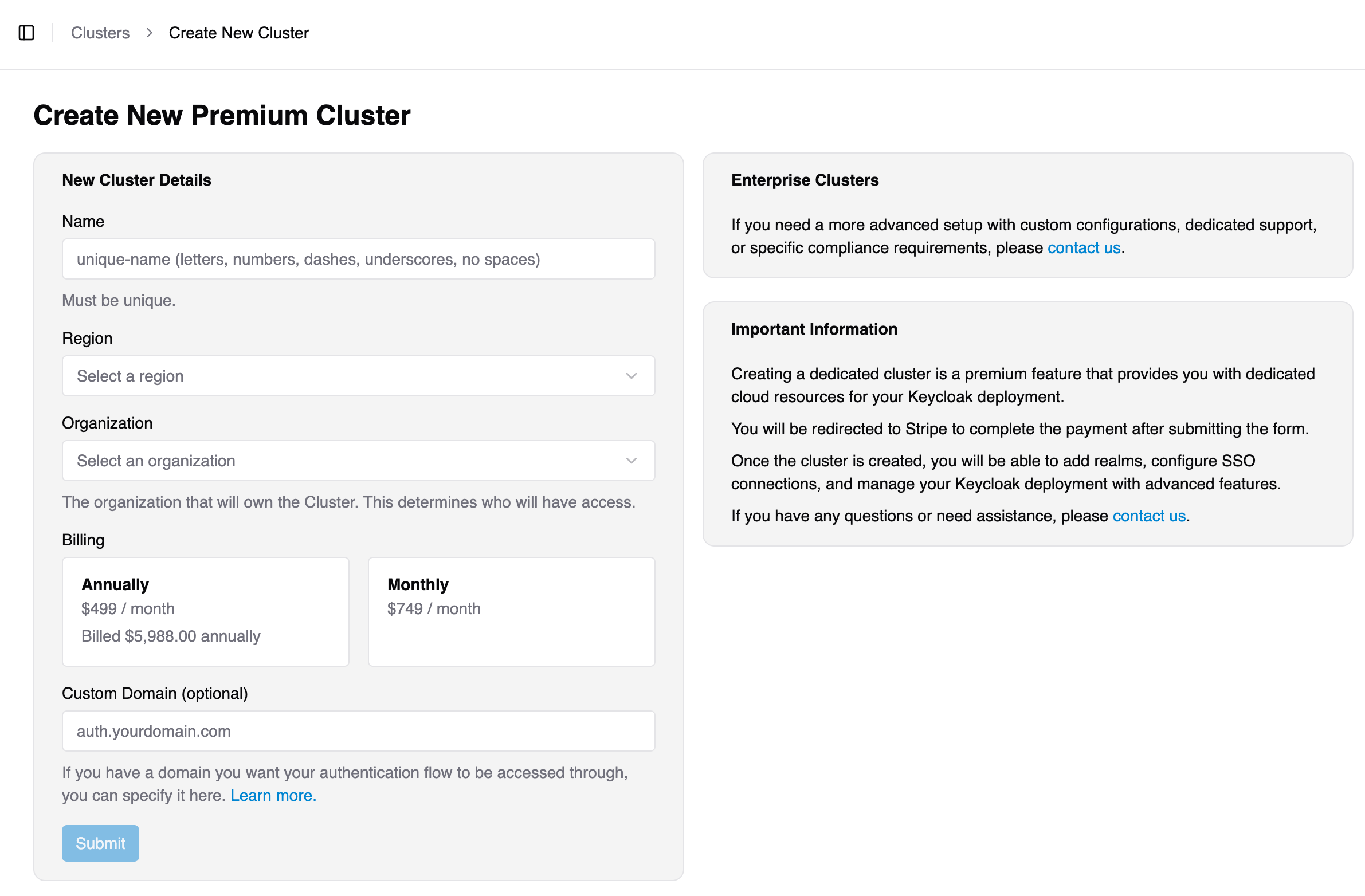
Once you have input the required information, you will be sent to Stripe, our payment partner, to set up your billing account and payment method.
Following successful billing setup, you will be returned to the Clusters view while your Cluster is provisioned. This is usually fast, but can take up to 24 hours in some cases. You will be notified by email and in the Clusters view when the Cluster is live.