Keycloak as an Identity and Access Management System (IAM)
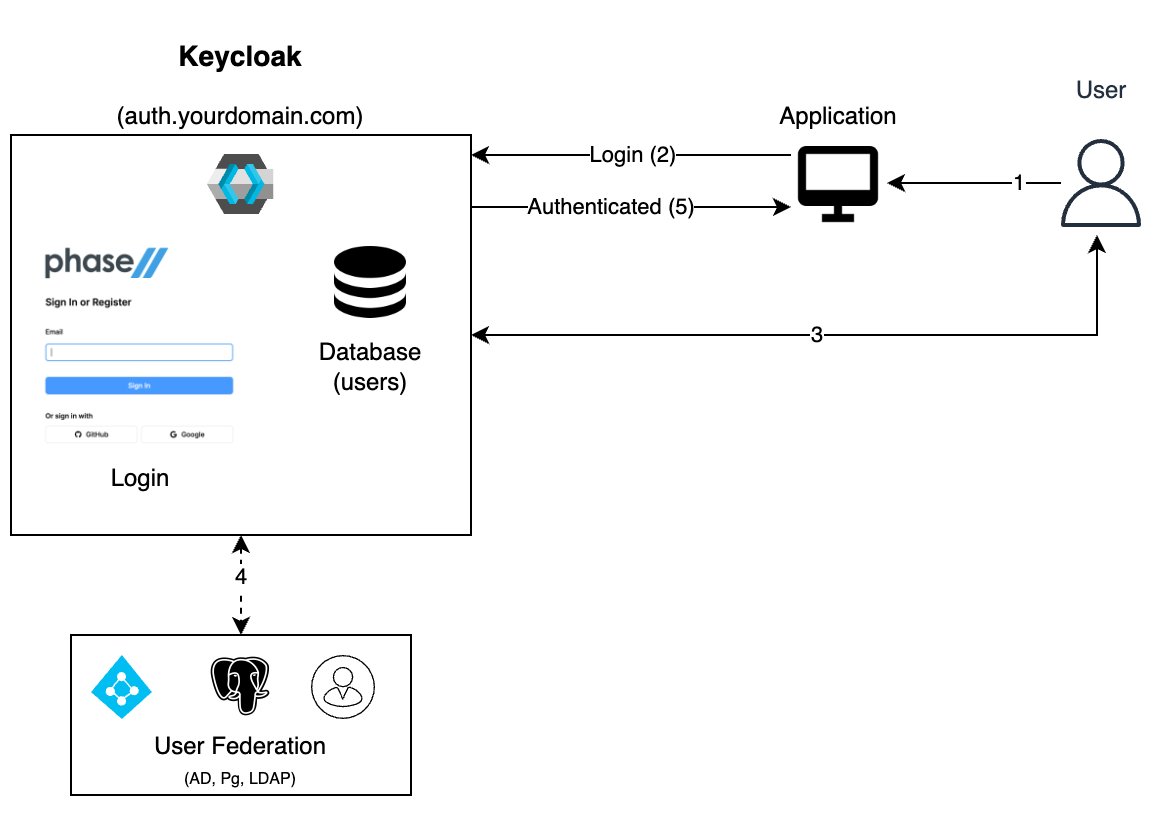
Keycloak is an identity and access management (IAM) platform: one place to authenticate your internal users, decide what each of them can reach, federate the directory you already run, and hand parts of that administration to people who should not be realm administrators. Applications consume its decisions as tokens over OAuth 2.0, OpenID Connect and SAML instead of implementing access control themselves.
This page is the shape of a Keycloak IAM deployment — what you configure, what the result looks like in a token, what it costs, and what Keycloak does not do. The official Keycloak documentation is the reference for what each setting means.
Keycloak 26.8.0 (quay.io/keycloak/keycloak:26.8.0 start-dev, H2 dev database, single
container). Every command, JSON body and byte count below is copied from a run on
5 October 2026.
What is IAM?
Identity and Access Management is the practice of giving the right people the right access to the right systems, for only as long as they need it. An IAM system owns four things: authentication (proving who someone is), authorization (deciding what they may do), federation (accepting identities that live in another system), and lifecycle (adding, changing and removing access as people join, move and leave).
Keycloak implements all four as a single server, and exposes them through standard protocols so that applications do not need their own user tables, password handling or permission checks.
Which Keycloak model fits your users?
The same server covers three distinct jobs, and which one you are doing changes almost every configuration decision that follows.
| Your users are | The model | What Keycloak does | Start here |
|---|---|---|---|
| Employees, contractors, internal staff | B2E / IAM | Owns the accounts, or federates them from your directory. You model access with groups and roles | This page |
| Customers of your product | B2C / CIAM | Self-registration, social login, consent, branded login pages at consumer volume | Keycloak for CIAM |
| Partners and tenants who bring their own IdP | B2B federation | Brokers to each organisation's SAML or OIDC provider and normalises what comes back | Keycloak as an identity provider broker |
Most deployments end up doing more than one. The reason to be explicit about which is which is that they disagree: a CIAM realm wants self-registration on, an IAM realm almost never does.
The access model: groups carry roles, users join groups
The durable pattern is three layers. Roles name a permission that an application understands. Composite roles bundle roles into something a person can be granted. Groups attach those bundles to an organisational unit, so joining a team grants access and leaving it removes access.
Point kcadm at a running server and build one:
alias kcadm='docker exec kc /opt/keycloak/bin/kcadm.sh'

kcadm config credentials --server http://localhost:8080 \
  --realm master --user admin --password admin

kcadm create realms -s realm=demo -s enabled=true

# Roles an application checks for
kcadm create roles -r demo -s name=app-user
kcadm create roles -r demo -s name=app-admin

# app-admin is a composite that includes app-user
kcadm add-roles -r demo --rname app-admin --rolename app-user

# The group that carries the baseline role
kcadm create groups -r demo -s name=engineering
kcadm add-roles -r demo --gname engineering --rolename app-user

GID=$(kcadm get groups -r demo -q search=engineering --fields id --format csv --noquotes)
kcadm create groups/$GID/children -r demo -s name=platform
Create a user, put them in the subgroup, and read back what they effectively hold:
kcadm create users -r demo -s username=dana -s enabled=true \
  -s email=dana@example.com -s firstName=Dana -s lastName=Example
kcadm set-password -r demo --username dana --new-password 'Str0ng-pass!'

UID=$(kcadm get users -r demo -q username=dana --fields id --format csv --noquotes)
SUB=$(kcadm get groups/$GID/children -r demo --fields id --format csv --noquotes)
kcadm update users/$UID/groups/$SUB -r demo -n

kcadm get users/$UID/role-mappings/realm/composite -r demo --fields name --format csv --noquotes
uma_authorization
default-roles-demo
app-user
offline_access
app-user is mapped on /engineering, Dana is only in /engineering/platform, and she has
it: role mappings inherit down the group tree. That is the whole reason to model access on
groups rather than assigning roles to users.
Two things bite in that sequence:
- Omit
email,firstNameorlastNameand the account cannot log in. The default user profile marks them required, and the failure surfaces at the token endpoint as{"error":"invalid_grant","error_description":"Account is not fully set up"}— which reads like a credential problem and is not one. kcadm get groupsreturns"subGroups" : [ ]even when subgroups exist. They are paginated behindgroups/<id>/children, so a script that walks the top-level listing will conclude the tree is flat.
What ends up in the token
Add a group membership mapper to the client the application uses, and the claim appears alongside the roles:
kcadm create clients -r demo -s clientId=internal-app -s publicClient=true \
  -s directAccessGrantsEnabled=true -s 'redirectUris=["*"]'
CID=$(kcadm get clients -r demo -q clientId=internal-app --fields id --format csv --noquotes)

kcadm create clients/$CID/protocol-mappers/models -r demo \
  -s name=groups -s protocol=openid-connect \
  -s protocolMapper=oidc-group-membership-mapper \
  -s 'config."claim.name"=groups' -s 'config."full.path"=true' \
  -s 'config."access.token.claim"=true'
{
  "groups": [
    "/engineering/platform"
  ],
  "realm_access": {
    "roles": [
      "offline_access",
      "uma_authorization",
      "default-roles-demo",
      "app-user"
    ]
  }
}
Note the asymmetry, because it is the most common source of "the permission is there but my
service says no". Roles inherit upward — app-user came from the parent group. The
groups claim does not: it lists the groups Dana is a direct member of, and /engineering
is absent. A service that authorizes on realm_access.roles sees inherited access. A service
that authorizes on the groups claim sees only leaf membership, and has to walk the path
prefix itself.
Leave full.path on. Setting it to false emits the bare group name, and group names are
not unique across the tree. With both /engineering/platform and /contractors/platform
present, the claim for either member is identical:
{ "groups": ["platform"] }
Any downstream policy written against that string now matches both populations. Upstream has already issued a CVE for one shape of this (CVE-2026-19608, fixed in 26.8.0), and the configuration that produces it is still available to you.
Roles are bytes in every request
Access tokens travel in the Authorization header on every call, so the access model has a
size. Measured on the realm above, with role names six characters long:
| Realm roles in the token | Access token |
|---|---|
| 5 | 1,341 bytes |
| 55 | 1,957 bytes |
Fifty extra roles cost about 616 bytes, roughly 12 bytes each. Longer names cost more — the
same test with eleven-character names reached 2,294 bytes. That is comfortable at this scale
and it is not free: nginx's default large_client_header_buffers is 4 8k, and a composite
role that fans out to several hundred entries, carried alongside a groups claim of full
paths, is how a login that works in staging returns 431 behind the production proxy. Grant
composites that match job functions, not one role per screen.
Delegated administration without handing over the realm
Giving a helpdesk manage-users gives it every user in the realm, including the
administrators. Fine-grained admin permissions v2 is the supported alternative and is
enabled by default in 26.8.0 — ADMIN_FINE_GRAINED_AUTHZ_V2 is a DEFAULT feature, while v1
is DEPRECATED and off. Turn it on per realm:
kcadm update realms/demo -s adminPermissionsEnabled=true
That creates an admin-permissions client in the realm, which is an ordinary authorization
services resource server. Permissions are then resource type + scopes + policies. The
resource types and the scopes each one accepts, read from the server:
| Resource type | Scopes |
|---|---|
| Users | view, manage, map-roles, manage-group-membership, reset-password, impersonate, delegate |
| Groups | view, manage, view-members, manage-members, manage-membership, manage-membership-of-members, impersonate-members, delegate-members |
| Clients | view, manage, map-roles, map-roles-client-scope, map-roles-composite |
| Roles | map-role, map-role-client-scope, map-role-composite |
| Organizations | view, manage |
Policies answer who, and the available types are the authorization services set: role,
group, user, client, client-scope, regex, time, resource, scope and
aggregate.
Three rules decide whether this works on the first try, and all three are counter-intuitive:
scopes have no hierarchy, so manage does not imply view; any legacy admin role on the same
user switches permission evaluation off entirely; and the list endpoints still need a
query-* role, without which you get a 200 [] that is indistinguishable from an empty
realm. Our
fine-grained admin permissions walkthrough
builds a working group-scoped admin and proves the boundary holds.
Connecting a directory you already have
Stock Keycloak 26.8.0 ships exactly two user storage providers — LDAP (which covers Microsoft Active Directory and the usual open-source servers) and Kerberos. Anything else is a provider you implement against the User Storage SPI.
Two settings decide the operational character of an LDAP federation, and both are easier to choose before you have users than after:
- Import users (
importEnabled, on by default) copies federated accounts into the Keycloak database on first lookup and keeps a local copy. Turning it off makes every lookup a live query against the directory. - Edit mode decides whether writes made in Keycloak — a password reset, an attribute change — are written back to the directory, held locally, or refused. Pick it against who owns the record, and see configuring federated LDAP storage for the exact semantics of each value.
Federation is also where an IAM realm meets a CIAM one. If your internal users come from a directory but your customers do not, those are two realms, not one with a clever filter.
Joiners, movers and leavers
Lifecycle is the half of IAM that audits actually fail on, and it is the half that has moved most in recent Keycloak releases.
SCIM 2.0 is supported as of 26.8.0 and the scim-api feature is now enabled by default —
no --features flag. The per-realm switch is still off, which is worth knowing because the
two failures look nothing alike:
curl -s -o /dev/null -w "%{http_code}\n" http://localhost:8080/realms/demo/scim/v2/Users
# 404  — realm toggle off

kcadm update realms/demo -s scimApiEnabled=true
curl -s -o /dev/null -w "%{http_code}\n" http://localhost:8080/realms/demo/scim/v2/Users
# 401  — endpoint live, now authenticate
A 404 here is a configuration state, not a wrong URL. The
SCIM setup walkthrough covers the service-account client
and the audience mapper that the endpoint needs before it will do anything useful.
Workflows is Keycloak's built-in automation for the rest: a YAML document that reacts to an event on a user and runs steps, some immediately and some after a delay — time-boxed contractor access, a disable step 90 days after someone joins a group, a reminder before an account expires. See Keycloak workflows, user onboarding and user offboarding.
What Keycloak does not do
Being specific about the gaps is more useful than a feature list, because these are the items that send teams shopping for a second product.
- No access certification. There is no campaign where a manager periodically reviews and signs off on who still holds what, and no attestation record to hand an auditor. Workflows can expire access on a schedule, which is a different control — it removes access without anyone confirming the remainder is still correct.
- No privileged access management. No credential vaulting, no session recording, no just-in-time elevation of an operating system or database account. Keycloak secures access to applications; it is not a PAM product.
- JavaScript authorization policies are not a console feature. The docs are explicit —
"By default, JavaScript Policies can not be uploaded to the server." They require the
scriptsfeature, which isPREVIEWand disabled in 26.8.0, and the script deployed as a JAR. Plan custom authorization logic as a deployed provider or an external decision service, not as a snippet someone pastes into the admin console. - Admin actions are logged, but retention is yours. Admin events are off by default
(
adminEventsEnabledisfalseon a new realm) and, once on, land in the database with no retention policy of their own. Compliance evidence means exporting them somewhere that keeps them.
Where Phase Two fits
Everything above is open-source Keycloak and runs anywhere. What it does not include is the operational half — upgrades on a schedule, backups you have restored from, HA, and the SOC 2 Type II and ISO 27001 evidence an IAM system is usually asked for. That is what we run: managed Keycloak clusters, with our open-source extensions on top for the things core Keycloak leaves out, including organizations and multi-tenancy.
If you are still mapping the pieces, Keycloak overview covers the full feature set, Keycloak account console covers end-user self-service and how to restrict it, and the Keycloak tutorials are the task-level how-tos.